Enemy Battle
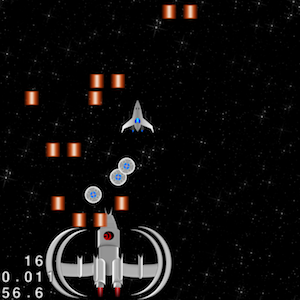
Shooting through the asteroid field is fun and challenging. But with a little practice it becomes fairly easy to beat the game. So how do we make our game more challenging? I can’t think of a better way to end our game than with a challenging battle. Just when the player is done with the asteroid field, the enemy ship comes in ready and fully equipped to take the player out.
To implement this, we need to do two things:
1. Get the enemy ship to animate at regular intervals and shoot lasers
2. Make the enemy ship smart enough to know where to move and shoot
For 1, we will be using Cocos2d-x move action to move the enemy ship and then use the spriteMovefinished(…) handler to call the move action again thus creating an animation loop. For 2, we will give the enemy ship a very simple but effective AI. This will make the game challenging and keep our implementation easy and clean. So here’s how we will implement our AI: for every enemy ship sprite move action we will simply pass in the player spaceship’s X-coordinate. This will make the enemy ship follow the player spaceship as it moves across the screen. To make this more natural we will introduce a small delay to the move action. This will ensure that the enemy ship doesn’t completely lock onto player moves and become impossible to defeat. To make the gameplay more interesting we will get the enemy ship to approach from behind instead of head-on. Since the player spaceship can only shoot lasers from the front in forward direction, we will introduce a new firing mode to release circular mines. Mines will be fired at a slower pace compared to the lasers thus adding further challenge to defeating the enemy ship.
16. In HelloWorldScene.h:
(a) Define the following constants:
#define MAX_PLAYER_MINES 30 //Max Number of Player Mines
#define MAX_ENEMY_PROJECTILES 40 //Max Number of Enemy Lasers
#define MAX_ENEMY_HEALTH 30.0f ///Max health of the Enemy spaceship
(b) Under the private declarations add:
//Keep track of current Player mine
int _playerMineCount;

//Player Mine sprites
cocos2d::CCSprite* _playerMines[MAX_PLAYER_MINES];
//Keep track of whether Enemy is spawned for initial move action
bool _spawnEnemy;

//Keep track of current Player projectile
int _enemyProjectileCount;

///Keep track of current Enemy spaceship health
int _enemyHealth;
//Enemy Spaceship sprite
cocos2d::CCSprite* _enemy;

//Enemy Laser sprites
cocos2d::CCSprite* _enemyProjectiles[MAX_ENEMY_PROJECTILES];

//Enemy sprite action finished Handler
void enemyMoveFinished(CCNode* sender);

//Create a new move action for the Enemy
void enemyAnimate();
17. In HelloWorldScene.cpp:
(a) Under HelloWorld::init() add before the schedule updateGame call:
		 //Initialize Player mine count
		 _playerMineCount = 0;

		 //Initilaize Enemy spawn status, current projectile count and health
		 _spawnEnemy = false;
		 _enemyProjectileCount =0;
		 _enemyHealth = MAX_ENEMY_HEALTH;

		 //Initialize Player Mine sprites
		 for (int i =0; i<MAX_PLAYER_MINES;++i) { 			 _playerMines[i] =  CCSprite::createWithSpriteFrameName("playermine.png"); 			 _playerMines[i]->setScale(SPRITE_SCALE_FACTOR);
			 _playerMines[i]->setVisible(false);
			 _playerMines[i]->setPosition(ccp(_player->getPositionX(),_player->getPositionY()-(_player->getScaleY()*_player->getContentSize().height)));
			 this->addChild(_playerMines[i]);
		 }

		 //Load Enemy Spaceship sprite
		 _enemy = CCSprite::createWithSpriteFrameName("enemyship.png");
		 _enemy->setScale(SPRITE_SCALE_FACTOR);
		 _enemy->setPosition(ccp(_winWidth/2,_origin.y - (_enemy->getContentSize().height * _enemy->getScaleY())));
		 _enemy->setVisible(false);
		 this->addChild(_enemy);

		 //Initialize Enemy projectile sprites
		 for (int i =0; i < MAX_ENEMY_PROJECTILES;++i) { 		 _enemyProjectiles[i] =  CCSprite::createWithSpriteFrameName("enemylaser.png"); 			_enemyProjectiles[i]->setScale(SPRITE_SCALE_FACTOR);
			_enemyProjectiles[i]->setVisible(false);
			_enemyProjectiles[i]->setPosition(ccp(_enemy->getPositionX(),_enemy->getPositionY()+(_enemy->getScaleY()*_enemy->getContentSize().height)));
			this->addChild(_enemyProjectiles[i]);
		 }
(b) Under HelloWorld::updateGame(float dt) add the below code to spawn the enemyship (this goes right after the asteroid spawning code and before the collision detection code):
        //Spawn Enemy 5 seconds after spawning the last asteroid
        if (_gameTime>ASTEROID_SPAWN_END+5.0f && !_spawnEnemy) {
        	//Stop backgrond scrolling
        	//_accelerate = false;
        	CocosDenshion::SimpleAudioEngine::sharedEngine()->playBackgroundMusic("enemy_background_music.ogg",true);
        	_enemy->setVisible(true);

        	//Reposition Player
        	CCMoveTo *playerMove = CCMoveTo::create(1.5, ccp(_winWidth/2, _winHeight/2+_player->getContentSize().height*_player->getScaleY()));
        	_player->runAction(CCSequence::create(playerMove,NULL));

        	//Bring in the Enemy with a move action
        	CCMoveTo *enemyMove = CCMoveTo::create(1.5, ccp(_winWidth/2, _origin.y+_enemy->getContentSize().height*_enemy->getScaleY()/2));
        	_enemy->runAction(CCSequence::create(enemyMove,CCCallFuncN::create(this,callfuncN_selector(HelloWorld::enemyMoveFinished)),NULL));
        	_spawnEnemy = true;
        }
(c) Under the HelloWorld::ccTouchesBegan(cocos2d::CCSet *touches, cocos2d::CCEvent *event) encapsulate the player laser shooting code in an if statement as follows so the player can release the mines when the enemy ship approches from behind:
if (!_spawnEnemy) { //Fire lasers

//Existing player laser shooting code

		} else { //Alternate fire mode - release mines from the back of the ship
			//Pick mine sprite from the projectile array and run an action on it
			_playerMines[_playerMineCount]->stopAllActions();
			_playerMines[_playerMineCount]->setPosition(ccp(_player->getPositionX(),_player->getPositionY()-(_player->getScaleY()*_player->getContentSize().height)));
			_playerMines[_playerMineCount]->setVisible(true);

			_playerMines[_playerMineCount]->runAction(CCRepeatForever::create(CCRotateBy::create(1.0f, 360.0f)));
			//Create a move action that is 2.0s long and moves the mine starting from the player position to the bottom of the screen
			_playerMines[_playerMineCount]->runAction(CCSequence::create(CCMoveTo::create(2.0f, ccp(_player->getPositionX(),_origin.x)),CCCallFuncN::create(this,callfuncN_selector(HelloWorld::spriteMoveFinished)),NULL));
			++_playerMineCount;

			//If reached the maximum number of sprites reset the the count to recycle the sprites
			if (_playerMineCount>=MAX_PLAYER_MINES) {
				_playerMineCount = 0;
			}
		}
(d) Add the HelloWorld::enemyMoveFinished(CCNode* sender) method:
void HelloWorld::enemyMoveFinished(CCNode* sender) {
	//If Enemy is not destroyed keep animating
	if (_enemyHealth>0) {
		enemyAnimate();
	}
}
(e) Add the HelloWorld::enemyAnimate() method:
void HelloWorld::enemyAnimate() {
	//Set the Enemy move postion to current Enemy Y and Player X
	CCPoint enemyPosition = ccp(_player->getPositionX(),_enemy->getPositionY());

	//If the new Enemy position is outside the visible width of the screen
	//Set the position to max left or max right
	if (enemyPosition.x + _enemy->getContentSize().width/2 * _enemy->getScaleX() > _winWidth) {
		enemyPosition.setPoint(_winWidth - _enemy->getScaleX() * _enemy->getContentSize().width/2,enemyPosition.y);
	} else if (enemyPosition.x - _enemy->getContentSize().width/2 * _enemy->getScaleX() < _origin.x) {     	enemyPosition.setPoint(_origin.x + _enemy->getScaleX() * _enemy->getContentSize().width/2,enemyPosition.y);
	}

	_enemy->runAction(CCSequence::create(CCMoveTo::create(0.4f,enemyPosition),CCCallFuncN::create(this,callfuncN_selector(HelloWorld::enemyMoveFinished)),NULL));

	//Shooting Delay
	float delay = 1.0f;

	//Distance between the Enemy laser projectiles relative to the Enemy sprite width
	float widthAdjustment = 4.0f;

	//Launch four projectiles with two sets of delays and X-coordinates based on the Enemy Spaceship width
	for (int i = 0; i < 2; ++i) { 		_enemyProjectiles[_enemyProjectileCount]->stopAllActions();
		_enemyProjectiles[_enemyProjectileCount]->setPosition(ccp(_enemy->getPositionX()-_enemy->getScaleX()*_enemy->getContentSize().width/widthAdjustment,_enemy->getPositionY()));
		_enemyProjectiles[_enemyProjectileCount]->setVisible(true);
		_enemyProjectiles[_enemyProjectileCount]->runAction(CCSequence::create(CCMoveTo::create(delay, ccp(_enemy->getPositionX()-_enemy->getScaleX()*_enemy->getContentSize().width/widthAdjustment,_winHeight)),CCCallFuncN::create(this,callfuncN_selector(HelloWorld::spriteMoveFinished)),NULL));

		++_enemyProjectileCount;

		_enemyProjectiles[_enemyProjectileCount]->stopAllActions();
		_enemyProjectiles[_enemyProjectileCount]->setPosition(ccp(_enemy->getPositionX()+_enemy->getScaleX()*_enemy->getContentSize().width/widthAdjustment,_enemy->getPositionY()));
		_enemyProjectiles[_enemyProjectileCount]->setVisible(true);
		_enemyProjectiles[_enemyProjectileCount]->runAction(CCSequence::create(CCMoveTo::create(delay, ccp(_enemy->getPositionX()+_enemy->getScaleX()*_enemy->getContentSize().width/widthAdjustment,_winHeight)),CCCallFuncN::create(this,callfuncN_selector(HelloWorld::spriteMoveFinished)),NULL));

		++_enemyProjectileCount;

		//For next two projectiles
		//Double the delay to make inner lasers moving slower
		delay += 0.5f;
		//Make the width closer to the center of the Enemy spaceship
		widthAdjustment *= 3.0f;
	}

	//If reached the maximum number of sprites reset the the count to recycle the sprites
	if (_enemyProjectileCount>=MAX_ENEMY_PROJECTILES) {
		_enemyProjectileCount = 0;
	}
}
In the code above, we first initialized the player mine sprites, enemy ship sprite and enemy laser projectile sprites in the init(…) method. Next, we added enemy spawning code in updateGame(…) method which spawns enemy ship five seconds after asteroid spawning finishes. To support alternate fire mode for releasing mines, we modified our touch event code in ccTouchesBegan(…). Finally, we created an animation loop using enemyMoveFinished() and enemyAnimate() methods. To clarify this further, the very first move action is triggered through updateGame(…) when the enemy is spawned. This move triggers enemyMoveFinished(…) which in turn calls enemyAnimate(..). In enemyAnimate(…), we move the enemy ship horizontally to player’s X-coordinate through a move action which in turn triggers enemyMoveFinished() thus creating an animation loop. This loop is broken once the enemy ship is destroyed.
Build/deploy the project and you should encounter the enemy ship after beating the asteroid field. Try moving left and right to see how the enemy ship follows you. You will notice there is no interaction between the player spaceship and the enemy. To address this we will implement enemy collision detection next.
You can download the completed source code for this step from here.
 pratiksapra.com
Thank you very much.
Written very well.