HUD
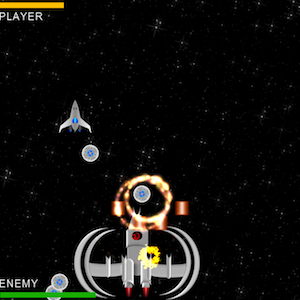
We are keeping track of both player and enemy health throughout the game lifecycle. It’s essential to display this information for the player to see. It’s also important to display this in an intuitive way without obstructing the screen. To do this, we will create two health bars: one for the player and one for the enemy. We will use green, yellow and red image sprites to signify remaining health. As the health changes, we will scale the images from 100% to 0% (1.0 to 0.0 scale value) to simulate a progress bar. When the health changes to red, we will also add a blinking effect to flash the health bar to make the player aware of low health.
19. In HelloWorldScene.h:
(a) Under the private declarations add health bar sprites and two methods to update them:
//Player health bar sprite and label
cocos2d::CCSprite* _playerHealthBar;
cocos2d::CCLabelTTF* _playerHealthLabel;

//Enemy health bar sprite and label
cocos2d::CCSprite* _enemyHealthBar;
cocos2d::CCLabelTTF* _enemyHealthLabel;

//Update Player health bar
void updatePlayerHealthBar();

//Update Enemy health bar
void updateEnemyHealthBar();

20.	In HelloWorldScene.cpp
(a) Under HelloWorld::init() add the code below right before the schedule updateGame call to initialize the health bar sprites:
		//Initialize Player and Enemy health bar sprites
		_playerHealthBar = CCSprite::createWithSpriteFrameName("health_bar_green.png");
		_playerHealthBar->setScale(SPRITE_SCALE_FACTOR);
		_playerHealthBar->setPosition(ccp(_origin.x+_playerHealthBar->getScaleX()*_playerHealthBar->getContentSize().width/2,_winHeight-_playerHealthBar->getScaleY()*_playerHealthBar->getContentSize().height));
		this->addChild(_playerHealthBar,10);

		_playerHealthLabel = CCLabelTTF::create("PLAYER", "Arial", 24);
		_playerHealthLabel->setPosition(ccp(_origin.x+_playerHealthLabel->getContentSize().width/2,_winHeight-_playerHealthLabel->getContentSize().height-_playerHealthBar->getScaleY()*_playerHealthBar->getContentSize().height));
		this->addChild(_playerHealthLabel, 10);

		updatePlayerHealthBar();

		_enemyHealthBar = CCSprite:: createWithSpriteFrameName ("health_bar_green.png");
		_enemyHealthBar->setScaleY(SPRITE_SCALE_FACTOR);
_enemyHealthBar->setPosition(ccp(_origin.x+_enemyHealthBar->getScaleX()*_enemyHealthBar->getContentSize().width/2,_origin.y+_enemyHealthBar->getScaleY()*_enemyHealthBar->getContentSize().height));

		_enemyHealthBar->setVisible(false);
		this->addChild(_enemyHealthBar,10);

		_enemyHealthLabel = CCLabelTTF::create("ENEMY", "Arial", 24);
		_enemyHealthLabel->setPosition(ccp(_origin.x+_enemyHealthLabel->getContentSize().width/2,_origin.y+_enemyHealthLabel->getContentSize().height+_enemyHealthBar->getScaleY()*_enemyHealthBar->getContentSize().height));
		_enemyHealthLabel->setVisible(false);
		this->addChild(_enemyHealthLabel, 10);

		updateEnemyHealthBar();
(b) Add the health bar update methods:
void HelloWorld::updatePlayerHealthBar() {
    //Scale the health bar by dividing current health by max health
    float scaleFactor = ((float)_playerHealth / MAX_PLAYER_HEALTH);
    _playerHealthBar->setScaleX(scaleFactor);
    _playerHealthBar->setPosition(ccp(_origin.x+_playerHealthBar->getScaleX()*_playerHealthBar->getContentSize().width/2,_winHeight-_playerHealthBar->getScaleY()*_playerHealthBar->getContentSize().height));
    //If health is between 40-60% display yellow bar
    if (scaleFactor*10 <=6 && scaleFactor*10 >= 4) {
        _playerHealthBar->setDisplayFrame(CCSpriteFrameCache::sharedSpriteFrameCache()->spriteFrameByName("health_bar_yellow.png"));
    } else if (scaleFactor*10 < 4) { //If health is less than 40% display blinking red bar
    	_playerHealthBar->setDisplayFrame(CCSpriteFrameCache::sharedSpriteFrameCache()->spriteFrameByName("health_bar_red.png"));
        //Create a blinking effect indicating low health
         CCBlink *blinkAction = CCBlink::create(1.0f,4);
         CCShow *showAction = CCShow::create();
         CCSequence *action = CCSequence::create(blinkAction,showAction,NULL);
         CCRepeatForever *repeatAction = CCRepeatForever::create(action);
        _playerHealthBar->runAction(repeatAction);
    }

}

void HelloWorld::updateEnemyHealthBar() {
    //Scale the health bar by dividing current health by max health
    float scaleFactor = ((float)_enemyHealth / MAX_ENEMY_HEALTH);
    _enemyHealthBar->setScaleX(scaleFactor);
_enemyHealthBar->setPosition(ccp(_origin.x+_enemyHealthBar->getScaleX()*_enemyHealthBar->getContentSize().width/2,_origin.y+_enemyHealthBar->getScaleY()*_enemyHealthBar->getContentSize().height));
     //If health is between 40-60% display yellow bar
    if (scaleFactor*10 <=6 && scaleFactor*10 >= 4) {
        _enemyHealthBar->setDisplayFrame(CCSpriteFrameCache::sharedSpriteFrameCache()->spriteFrameByName("health_bar_yellow.png"));
    } else if (scaleFactor*10 < 4) {
    	_enemyHealthBar->setDisplayFrame(CCSpriteFrameCache::sharedSpriteFrameCache()->spriteFrameByName("health_bar_red.png"));
        //Create a blinking effect indicating low health
         CCBlink *blinkAction = CCBlink::create(1.0f,4);
         CCShow *showAction = CCShow::create();
         CCSequence *action = CCSequence::create(blinkAction,showAction,NULL);
         CCRepeatForever *repeatAction = CCRepeatForever::create(action);
         _enemyHealthBar->runAction(repeatAction);
    }
}
(c) Under HelloWorld::updateGame(float dt) in the collision detection code wherever we decrement player health or enemy health, add the update health bar calls as below:
//Collision detection AsteroidPlayer, AsteroidPlayer projectiles
if (asteroidRect.intersectsRect(playerRect)) {
	--_playerHealth;
	updatePlayerHealthBar();//
//Collision detection Player Mines  Enemy
if (projectileRect.intersectsRect(enemyRect)) {
	//...existing code
	 --_enemyHealth;
       updateEnemyHealthBar();////Collision detection Enemy Projectiles  Player
if (projectileRect.intersectsRect(playerRect)) {
	//...existing code
	 --_playerHealth;
       updatePlayerHealthBar();
(d) Under HelloWorld::updateGame(float dt) in the enemy spawning code add the below to make enemy health bar visible when the enemy ship spawns:
// Spawn Enemy ship 5 seconds after spawning the last asteroid
      if (_gameTime>ASTEROID_SPAWN_END+5.0f && !_spawnEnemy) {
           //...existing code
	   _enemyHealthBar->setVisible(true);
	   _enemyHealthLabel->setVisible(true);
21. Open AppDelegate.cpp (under Classes) and comment the following line under AppDelegate::applicationDidFinishLaunching() (to stop displaying Cocos2d-x FPS statistics since these can overlap health bars):
//pDirector->setDisplayStats(true);
In the code above, we first defined variables to keep track of the player and enemy health bars. We then initialized the health bar sprites in the init(…) method. We implemented updatePlayerHealthBar() and updateEnemyHealthBar() methods to individually update the player and enemy health bars. Next, in updateGame(…) method we added calls to update health bar methods whenever player or enemy health value is changed. Finally, we added code to make the enemy health bar visible when enemy ship is spawned.
Build/deploy the project and you should be able to see the health bars update as the player and enemy health changes.
You can download the completed source code for this step from here.
 pratiksapra.com
Thank you very much.
Written very well.