Game Over & Restart
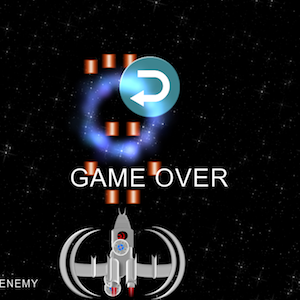
Without game win/lose logic, the player can neither win nor lose the game. So let’s go ahead and implement this along with the ability to restart the game in case the user wants to play again.
22. In HelloWorldScene.h:
(a) Under private declarations add:
//Game Over status
int _gameOver;
//Display Game Result
cocos2d::CCLabelTTF* _gameResultLabel;

//Main menu
cocos2d::CCMenu* _mainMenu;

//Restart Game
cocos2d::CCMenuItemImage* _restartMenuItem;

//Handle win/lose
void endGame(bool won);

//Restart menu item handler
void menuRestartCallback(CCObject* sender);
23. In HelloWorldScene.cpp
(a) Under HelloWorld::init() add before the schedule updateGame call:
_gameOver = false;

//Initialize game result label
_gameResultLabel = CCLabelTTF::create("", "Arial", 60);
_gameResultLabel->setVisible(false);
this->addChild(_gameResultLabel,1);

//Initialize restart menu item
_restartMenuItem = CCMenuItemImage::create();
_restartMenuItem->setNormalSpriteFrame(CCSpriteFrameCache::sharedSpriteFrameCache()->spriteFrameByName("restart.png"));
_restartMenuItem->setTarget(this,menu_selector(HelloWorld::menuRestartCallback));
_restartMenuItem->setScale(0.5f);
_restartMenuItem->setPosition(_winWidth/2, _winHeight/2 + _restartMenuItem->getScaleY() * _restartMenuItem->getContentSize().height);
_restartMenuItem->setEnabled(false);
_restartMenuItem->setVisible(false);

//Create main menu
_mainMenu = CCMenu::create(_restartMenuItem,NULL);
_mainMenu->setPosition(CCPointZero);
this->addChild(_mainMenu, 1);
(b) Add the restart menu item handler and the end game method:
void HelloWorld::menuRestartCallback(CCObject* sender) {
//Restart game with a cool rotozoom transition
	CCDirector::sharedDirector()->replaceScene(CCTransitionRotoZoom::create(1.0, this->scene()));
}

void HelloWorld::endGame(bool won) {
	if (won) {
		_enemyHealthLabel->setVisible(false);
		_enemyHealthBar->setVisible(false);
		_gameResultLabel->setString("YOU WIN!");

	} else {
		_playerHealthLabel->setVisible(false);
		_playerHealthBar->setVisible(false);
		_gameResultLabel->setString("GAME OVER");
	}
	_gameResultLabel->setPosition(ccp(_winWidth/2,_winHeight/2 -_gameResultLabel->getContentSize().height));
	_gameResultLabel->setVisible(true);
	_gameOver = true;
	_restartMenuItem->setVisible(true);
	_restartMenuItem->setEnabled(true);
}
(c) Under HelloWorld::updateGame(float dt) in the collision detection code there are three places where we need to call the endGame method passing in the appropriate true/false values for winning state:
//Collision detection Asteroid <-> Player
if (asteroidRect.intersectsRect(playerRect)) {
	//...code
	if (_playerHealth <=0) {
		//...code
		endGame(false);//<-Add this call
	}
}

//Collision detection Player Projectiles <-> Enemy
if (projectileRect.intersectsRect(enemyRect)) {
	//...code
	if (_enemyHealth <= 0) {
		//...code
		endGame(true);//<-Add this call
	}
}

//Collision detection Enemy Projectiles <-> Player
if (projectileRect.intersectsRect(playerRect)) {
	//...code
	if (_playerHealth <=0) {
		//...code
		endGame(false);;//<-Add this call
	}
}
(d) When the game ends the player should no longer be able to move or shoot. In HelloWorld::ccTouchesBegan(cocos2d::CCSet *touches, cocos2d::CCEvent *event ) method encapsulate the entire code inside the below if statement:
void HelloWorld::ccTouchesBegan(cocos2d::CCSet *touches, cocos2d::CCEvent *event ) {
	if (!_gameOver) {
		//...existing code
	}
}
(e) After the game ends, we no longer need to spawn asteroids, the enemy or check for collisions. In HelloWorld::updateGame(float dt) method encapsulate everything other than our background scrolling code inside the below if statement.
if (!_gameOver) {
	//Update player position based on accelerometer values
	//Spawn Asteroids
	//Spawn Enemy
	//Collision detection Asteroid<->Player, Asteroid<->Player projectiles
	//Collision detection Player Projectiles <-> Enemy
	//Collision detection Enemy Projectiles <-> Player
}
In the code above, we first defined the variables to keep track of the game result and Cocos2d-x menu items for restarting the game. In the init(…) method, we initialized game result and created the restart menu. Next, we implemented menuRestartCallback(…) handler method to restart the game. Cocos2d-x provides a fairly easy way to do this using the replaceScene(…) call which reinitializes our game scene. Next, we implemented the endGame(…) helper method which ends the game depending on the won parameter and displays appropriate information on the screen. We then call this method in updateGame(…) whenever the player health or enemy health is 0 to end the game. Finally, we disable our touch event code and all of updateGame (except background scrolling) once the game is over. This prevents the player from shooting when the game is over. Also once the game is ended we no longer need to do anything in updateGame(…) except keep scrolling the background.
Build/deploy the project to test out the game over logic and restart option.
You can download the completed source code for this step from here.
 pratiksapra.com
Thank you very much.
Written very well.