Adding Resources
Before we can get down to building our game, we need to add all the resources/assets we will be using. Get the resources from the GitHub repository located here. To download the resources click on the Zip button. Once the file is downloaded, unzip it to any directory of your choice. To add resources to your project:
1. Open the directory where you unzipped the repository
2. Open the Resources directory, select all the files, right-click and select copy.
3. Right-click the Resources folder under HelloCpp project in the Project Explorer and select paste.
After adding resources, your HelloCpp folder hierarchy should look like below:
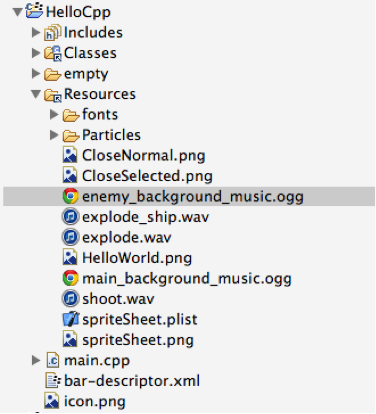
I have put all the image resources on a sprite sheet using the TexturePacker tool which also creates the corresponding Cocos2d-x compatible .plist file. You might be wondering why we are going through this extra step when we can use image resources directly. Using a spritesheet can result in significant memory savings compared to loading images individually. Also the spritesheet generated by TexturePacker is in POT (Power of 2 width and height) format which is optimal for the GPU and yields the best performance. Cocos2d-x includes in-built support for loading spritesheets and .plist files making it extremely simple to use this in your game. With all the resources in place, let’s start building our game.
 pratiksapra.com
Thank you very much.
Written very well.