Shooting Lasers
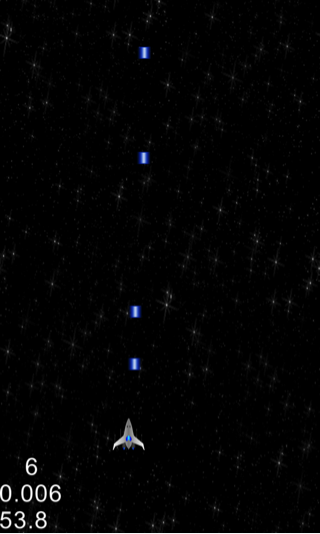
Let’s give our spaceship the ability to shoot. To do this, we will create an array of blue laser sprites. On every touch event, we will pick a sprite from the array and animate it across the screen. We will use Cocos2d-x sprite move actions to achieve this.
10. In HelloWorldScene.h:
(a) Define the following constant:
#define MAX_PLAYER_PROJECTILES 10 //Max Number of Player Lasers
(b) Under private declarations add:
//Keep track of current Player projectile
int _playerProjectileCount;

//Player Laser sprites
cocos2d::CCSprite* _playerProjectiles[MAX_PLAYER_PROJECTILES];

//Handle touch events
void ccTouchesBegan(cocos2d::CCSet *touches, cocos2d::CCEvent *event);

//Standard sprite action finished Handler
void spriteMoveFinished(CCNode *sender);
11. In HelloWorldScene.cpp
(a) Under HelloWorld::init() right before the schedule updateGame call add:
		//Initialize Player projectile count
		_playerProjectileCount = 0;

		//Initialize Player projectile sprites
		for (int i = 0; i < MAX_PLAYER_PROJECTILES; ++i) {
			_playerProjectiles[i] = CCSprite::createWithSpriteFrameName(
					"playerlaser.png");
			_playerProjectiles[i]->setScale(SPRITE_SCALE_FACTOR);
			_playerProjectiles[i]->setVisible(false);
			_playerProjectiles[i]->setPosition(ccp(_player->getPositionX(),_player->getPositionY()+(_player->getScaleY()*_player->getContentSize().height)));
			this->addChild(_playerProjectiles[i]);
		}

		//Enable touch events
		this->setTouchEnabled(true);
(b) Implement the touch event handler by adding the HelloWorld::ccTouchesBegan(cocos2d::CCSet *touches, cocos2d::CCEvent *event ) method:
void HelloWorld::ccTouchesBegan(cocos2d::CCSet *touches,cocos2d::CCEvent *event) {
	//We can choose one of the touches to work with
	CCTouch* touch = (CCTouch*) (touches->anyObject());
	CCPoint location = touch->getLocation();

	//Pick laser sprite from the projectile array and run an action on it
	_playerProjectiles[_playerProjectileCount]->stopAllActions();
	_playerProjectiles[_playerProjectileCount]->setPosition(ccp(_player->getPositionX(),_player->getPositionY()+(_player->getScaleY()*_player->getContentSize().height)));
	_playerProjectiles[_playerProjectileCount]->setVisible(true);

	//Create a move action that is 0.4s long and moves the projectile starting from the player position to the top of the screen
	_playerProjectiles[_playerProjectileCount]->runAction(CCSequence::create(CCMoveTo::create(0.4f,ccp(_player->getPositionX(),_winHeight)),CCCallFuncN::create(this,callfuncN_selector(HelloWorld::spriteMoveFinished)),NULL));
	++_playerProjectileCount;

	//If reached the maximum number of sprites reset the the count to recycle the sprites
	if (_playerProjectileCount >= MAX_PLAYER_PROJECTILES) {
		_playerProjectileCount = 0;
	}
	CocosDenshion::SimpleAudioEngine::sharedEngine()->playEffect("shoot.wav");
}
(c) Implement the standard sprite move finished handler method HelloWorld::spriteMoveFinished(CCNode* sender) to hide the sprite once the move action finishes:
void HelloWorld::spriteMoveFinished(CCNode* sender) {
	sender->setVisible(false);
}
In the code above, we first initialized a set of laser projectile sprites that player spaceship can shoot. Next, we added the call to setTouchEnabled(…) method which tells Cocos2d-x to start sending touch events to our game. To handle touch events, we override the ccTouchesBegan(…) method. Every time a touch event happens, we take the next available sprite from the laser projectile array and create a Cocos2d-x move action for it. The move action simply scrolls the laser vertically across the screen until the laser is off the screen. We also play a shooting sound effect along with the move action. Finally, we implement the spriteMoveFinished(…) method which hides the laser sprite once it’s off the screen i.e. the move action finishes.
Build/deploy the project and you should be able to shoot lasers by tapping on the screen.
You can download the completed source code for this step from here.
 pratiksapra.com
Thank you very much.
Written very well.