Asteroids Collision Detection
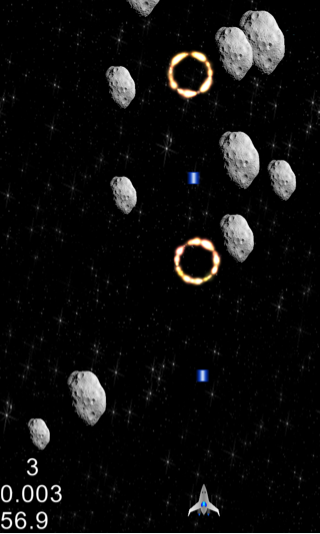
You must have already noticed that there is no interaction between the player spaceship, lasers and asteroids. Colliding with asteroids results in no damage to the ship and when we shoot asteroids don’t get destroyed. We need to implement collision detection to add these interactions. We will be using a simple collision detection scheme. To detect collisions between two sprites, we will get their bounding rectangles and intersect them. If the rectangles intersect, we have a collision. This scheme is not perfect since sprite contents are not always rectangular and have transparency space. When we create the bounding rectangle we are also taking into account the extra transparent space. For the game we are building which doesn’t require very fine precision, this will work. Cocos2d-x does offer more advanced ways to detect collisions through the Box2D physics engine which I am planning to cover in a future blog post. When a collision occurs we need to take an action. For example, when the asteroids collide with the spaceship or when a laser projectile collides with the asteroid. Cocos2d-x comes with an in-built particle system featuring cool particle effects such as explosion, fire, smoke etc. We will use these effects extensively throughout our game. Most of these effects are predefined as .plist files under Resources/Particles folder of TestCpp sample application that comes with Cocos2d-x. I have included the Particles folder with the game resources you downloaded in the beginning so your project should already have it. We also need to keep track of the player spaceship health and update it when there is a collision. This will help us in implementing the game win/lose logic later on.
Before getting into the collision detection code, let’s take a quick look at the algorithm we will be using:
for each asteroid
	if asteroid is visible
		intersect asteroid with player
		for each player laser projectile
			if laser projectile is visible
				intersect asteroid with laser projectile
Let’s go ahead and implement this.
14. In HelloWorldScene.h:
(a) Define the following constant:
#define MAX_PLAYER_HEALTH 10.0f //Max health of the Player spaceship
(b) Under private declarations add:
//Keep track of Player spaceship health
float _playerHealth;

//Create a particle effect with a plist file and position
void createParticleEffect(const char* filename, float x, float y);

//Create a particle effect using a plist file, position, start color, duration and end size
void createParticleEffect(const char* filename, float x, float y, cocos2d::ccColor4F startColor, float duration, float endSize);
15. In HelloWorldScene.cpp
(a) Under HelloWorld::init() add right before the schedule updateGame call:
	//Initialize Player health
	_playerHealth = MAX_PLAYER_HEALTH;
(b) Under HelloWorld::updateGame() add at the end right after the asteroid spawning code:
         //Collision detection Asteroid<->Player, Asteroid<->Player projectiles
        for (int i = 0; i < NUM_ASTEROIDS; ++i) {
        	//We only need to check collisions if the current Asteroid and Player are visible
        	if (_asteroids[i]->isVisible() && _player->isVisible()) {
        		if (_asteroids[i]->boundingBox().intersectsRect(_player->boundingBox())) {
        			--_playerHealth;
        			CocosDenshion::SimpleAudioEngine::sharedEngine()->playEffect("explode.wav");
        			if (_playerHealth <=0) {
        				_player->stopAllActions();
        				_player->setVisible(false);
        				//Destroy Player spaceship with a sound effect and a custom exploding ring particle effect
        				ccColor4F startColor = {0.4f, 0.5f, 1.0f, 1.0f};
        				createParticleEffect("Particles/ExplodingRing.plist",_player->getPositionX(),_player->getPositionY(),startColor,1.0f,100.0f);
        				CocosDenshion::SimpleAudioEngine::sharedEngine()->playEffect("explode_ship.wav");
        			} else {
        				_asteroids[i]->setVisible(false);
        				//Create an exploding ring particle effect for the Asteroid destruction
        				createParticleEffect("Particles/ExplodingRing.plist",_asteroids[i]->getPositionX(),_asteroids[i]->getPositionY());
        				//Create a blinking effect signifying player ship damage
        				CCBlink *blinkAction = CCBlink::create(1.0f,10);
        				CCShow *showAction = CCShow::create();
        				CCSequence *action = CCSequence::create(blinkAction,showAction,NULL);
        				_player->runAction(action);
        			}
        		}

        		//For each Player projectile check for collision with the current asteroid
        		for (int j = 0; j < MAX_PLAYER_PROJECTILES; ++j) {
        			if (_playerProjectiles[j]->isVisible()) {
        				if (_playerProjectiles[j]->boundingBox().intersectsRect(_asteroids[i]->boundingBox())) {
        					_asteroids[i]->setVisible(false);
        					_playerProjectiles[j]->setVisible(false);
        					createParticleEffect("Particles/ExplodingRing.plist",_asteroids[i]->getPositionX(),_asteroids[i]->getPositionY());
        					CocosDenshion::SimpleAudioEngine::sharedEngine()->playEffect("explode.wav");
        				}
        			}
        		}
        	}
        }
(c) Implement the createParticleEffect() helper methods for creating differenct Cocos2d-x particle effects:
void HelloWorld::createParticleEffect(const char* filename, float x, float y) {
	 CCParticleSystem* emitter = CCParticleSystemQuad::create(filename);
	 emitter->setPosition(x,y);
	 emitter->setAutoRemoveOnFinish(true);
	 addChild(emitter, 10);
}

void HelloWorld::createParticleEffect(const char* filename, float x, float y, ccColor4F startColor, float duration, float endSize) {
	 CCParticleSystem* emitter = CCParticleSystemQuad::create(filename);
	 emitter->setPosition(x,y);
	 emitter->setStartColor(startColor);
	 emitter->setDuration(duration);
	 emitter->setEndSize(endSize);
	 emitter->setAutoRemoveOnFinish(true);
	 addChild(emitter, 10);
}
In the code above, we first defined a constant to set maximum player health. Next we implemented our collision detection algorithm in the updateGame(…) method exactly as we decribed earlier. Finally, we implemented two versions of the particle effect helper method createParticleEffect(…) so we can create particle effects throughout our game without rewriting the same code.
Build/deploy the project. You should be able to shoot and destroy asteroids. If the player spaceship collides ten times, it will become invisible indicating game over. At this point, you will still be able to shoot because our touch event code doesn’t know about this. We will address this at a later point in the tutorial when we implement the final parts of the game.
You can download the completed source code for this step from here.
 pratiksapra.com
Thank you very much.
Written very well.